
Your whole site, as it happens.
Attendance, equipment, the daily close and project money in one record, in Arabic and English.
An illustrative working day
See every site at a glance.
One map for the company, then a live view of each project: who's in, who's outside, and who needs attention.
on site, of 100 expected
- North Riyadh Tower2 need attention
- South Riyadh RoadsAll clear
- Diriyah Enabling Works7 not in yet
One day, from gate to signature.
Field work reaches the record as it happens, so closing the day doesn't mean writing it again.
- 07:50
Crews check in
By phone, through a foreman, or at a kiosk by the gate.
0of 46 crew on site- Site app27
- Foreman9
- Kiosk6
- 10:30
Work is recorded
Progress, issues and safety reports arrive from the field.
- Level 12 slab, rebar 80%07:48
- Tower crane started on level 1209:12
- Rebar delivery moved to Thursday10:30
- Concrete pour, 64 m³13:20
- 13:10
Requests get decided
Exceptions and approvals wait in one Inbox.
- Late check-in, 2 workersAttendance
- Scaffolding hire, SAR 94,500Expense
- Daily log, excavatorEquipment
- Claim 3, NovemberClaim
- 17:00
The day is signed
The site manager explains deviations and locks the diary.
Site diarySigned and locked- Crew
- 42 of 46
- Machines
- 5 working
- Progress
- 4 items
- Deviations
- 1 explained
Six products, one record
Start with what costs you most. Everything connects as you add more.
Verified check-ins and a live view of every site
Explore- Geofenced check-in from the site app
- Live view of who's in, out, or needs attention
- Clean days close themselves; exceptions reach a reviewer
Attendance for workers without a phone
Explore- Code, PIN and photo on a shared tablet
- Keeps recording when the connection drops
- Pair, revoke and manage tablets from the web
Observations, incidents and site issues through to closure
Explore- Report observations and incidents from the phone
- Investigate and assign corrective actions
- Track site issues through to verified closure
Close each day from recorded facts, then sign it
Explore- The day built from records, not retyped
- Deviations explained, with AI suggestions
- A signed diary that can't be changed afterwards
Budget, expenses, petty cash, contract and claims
Explore- Budget, actual and forecast by cost code
- One ledger for approved and paid costs
- Claims checked against the contract and BOQ
Machines, daily logs, maintenance and rentals
Explore- Every machine's site, operator and status
- Daily logs with meter and fuel evidence
- Preventive maintenance and rentals on schedule
The screens your team works in.
Real screens from SiteFlow, as your office and site managers see them every day.
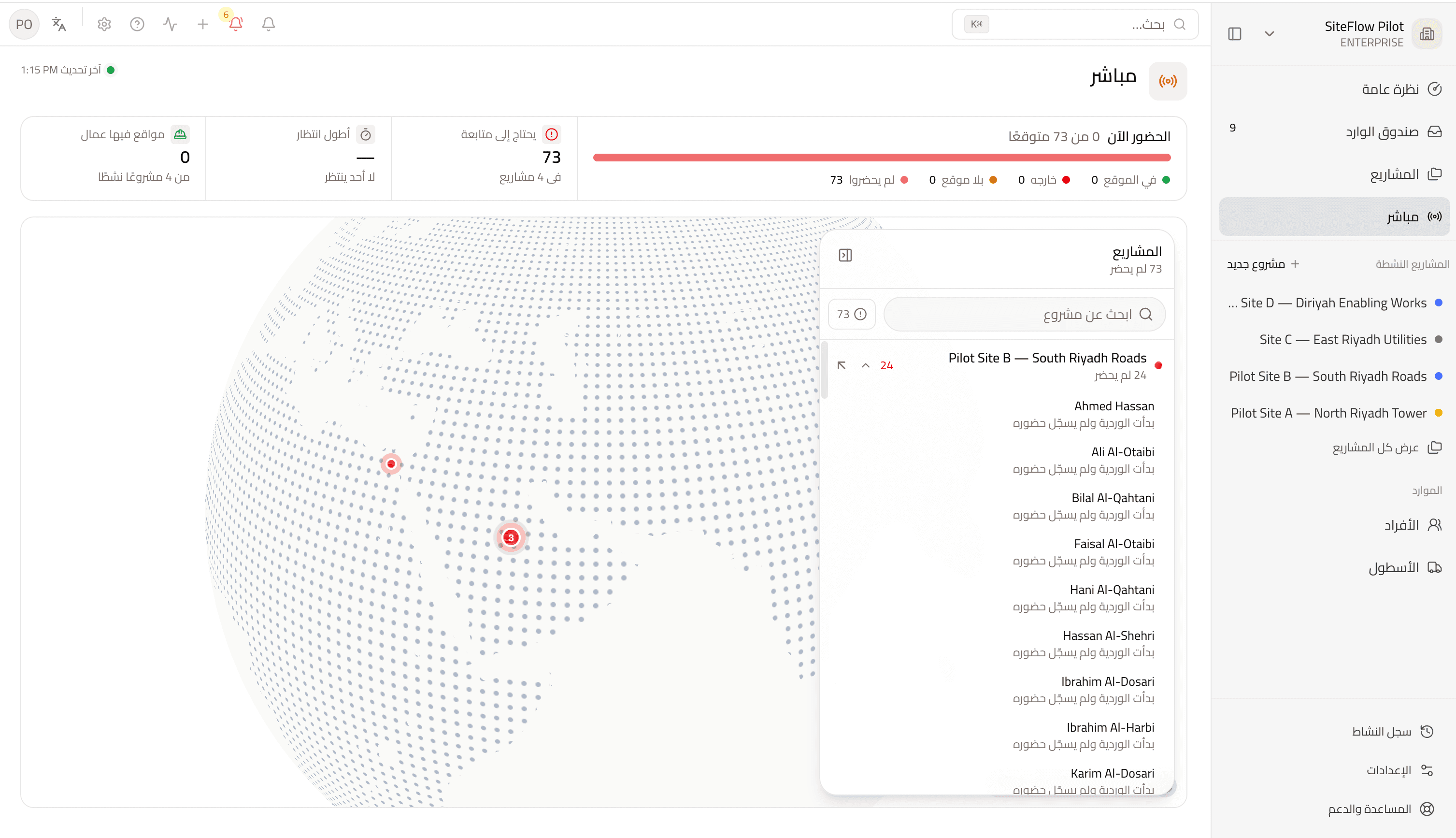
Everyone counts, with or without a smartphone.
Three ways to record attendance, one record at the end.
Phone
Workers check in from the site app inside the geofence.
Foreman
Supervisors punch crew members who have no login.
Kiosk
A shared tablet at the gate, with a code, PIN and photo. It keeps working offline.
Report it on site. Follow it until it's closed.
Observations, near misses and incidents stay on one track, with an owner at every step.
Reported
From the phone, with photos.
Investigating
Cause and people involved on record.
Actions open
Each action has an owner.
Closed
Done, and it stays on file.
Project money, from budget to certified claim.
Cost codes, expenses and petty cash on one side. Contract, variations and retention on the other.
- Reinforced concrete632,400
- Reinforcement steel1,382,400
- Formwork1,089,000
- Blockwork241,920
Net due, SAR
Know which machines worked today.
Operators log sessions from the app, with meter and fuel evidence. Service comes due by meter or days.
Every decision in one queue.
14 approval types on the web and the phone. Nobody approves their own request.
Expenses · Cash advances · Advance settlements · Leave · Attendance overrides · Attendance reviews · Period reopening · Equipment logs · Work orders · Roster workers · Device trust · Budget revisions · Variations · Claims
AI that reads your project's records.
It helps your team read and write faster. People still make the decisions.
Which issues are blocking the tower this week?
Two open items are holding work on level 12: the delayed rebar delivery and the guardrails at the slab opening. Both have owners, and the guardrails are due tomorrow.
Project brief
A short summary of where a project stands.
Day summary and reasons
A summary of the day and suggested reasons for deviations.
Improve text
Tidy written notes in one step.
Made for how contractors work here.
Arabic is the default, not a translation added later.
- Arabic first
- Every screen works in Arabic and English, with full RTL.
- 13 site roles
- From owner to driver, each role sees what its job needs.
- Offline field capture
- Check-ins, progress, photos and problems queue until there's signal.
- Fair tracking
- Your company sets location tracking, and workers can decline.
Made for the people on site.
Four tabs, in Arabic and English, that work with gloves on and bad signal.
Today
Check in and see today's shift.
Site
What's happening on your project.
Capture
Record progress, photos and problems.
Inbox
Decide requests from the phone.
Plans in SAR
Every plan includes the whole product. Only the limits change.
See your sites in SiteFlow.
Book a demo and we'll walk through how a day on your site becomes a record you can rely on.